Alphabet Beads: A Creative Design Tool You Should Know
What Is Alphabet Beads and Why It Matters
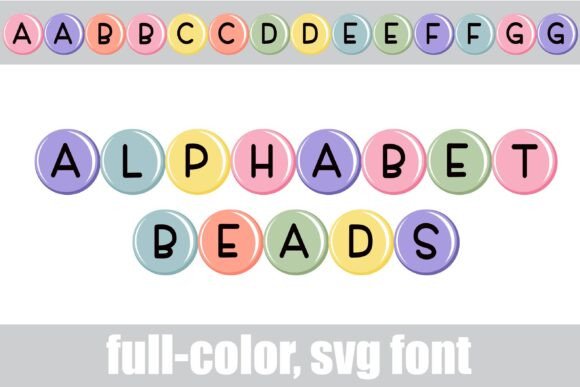
Alphabet Beads is a vibrant, full-color SVG font that brings a playful and polished aesthetic to digital and print design projects. Featuring soft, pastel-colored beads in a rounded, approachable style, this font is ideal for crafting, scrapbooking, logo design, or any project that benefits from a touch of whimsy and personality. What makes Alphabet Beads stand out is its dual-color character set and access to bonus glyphs like a bunny and chick, which can be triggered by typing the greater than and less than symbols.
Because it's an OpenType full-color SVG font, Alphabet Beads installs just like a standard .otf font. Mac users typically install it through FontBook, while Windows users can install via the Control Panel or a preferred font manager. However, compatibility is key—color fonts will appear in black in programs that don't support SVG rendering. Adobe apps, Silhouette Studio, Inkscape, and Quark are among the few that currently support full-color SVG fonts.
Common Mistakes When Using Alphabet Beads
While Alphabet Beads offers a fun and flexible design option, users—especially beginners—often run into issues that can impact their workflow or final output. Below are some common mistakes and how to avoid them.
Mistake 1: Assuming All Programs Support Color Fonts
One of the most frequent misunderstandings is assuming that all software applications will display Alphabet Beads in full color. Unfortunately, most programs—including many Microsoft Office applications—do not support SVG color fonts. Even some design programs may show the font in black in the font selection menu, though it will render in color once typed.
Better approach: Always test the font within your document, not just the font menu. If you're unsure whether your software supports SVG fonts, check Adobe’s list of compatible apps or confirm support in Silhouette Studio or Inkscape before committing to a design.
Mistake 2: Not Accessing the Alternate Glyphs Correctly
Alphabet Beads includes alternate characters in different color palettes, which can be accessed via the glyph map in compatible software like Adobe Illustrator or Silhouette Studio. Some users miss out on these options because they don’t know where to look or assume the default character set is the only one available.
Better approach: Explore the Glyphs panel in Adobe apps or the glyph map feature in Silhouette Studio to switch between alternate colors for each letter. This can help you match the font to your project’s color scheme more effectively.
Mistake 3: Ignoring the Bonus Characters
Many users overlook the hidden bunny and chick glyphs that come with Alphabet Beads. These are accessible by typing the greater than (>) and less than (<) symbols. These characters can add a fun visual accent to your design, especially for seasonal or holiday-themed projects.
Better approach: Try inserting these glyphs into your layout to add a subtle but charming design element. They scale beautifully due to the vector nature of SVG fonts and won’t pixelate at any size.
Mistake 4: Installing the Font Incorrectly
Some users install Alphabet Beads but can't find it in their font menu, leading to frustration. This often happens when the font file isn’t fully extracted or installed properly, especially if it came as part of a larger font bundle.
Better approach: Make sure to double-click the .otf file and install it via your system’s font manager. On Mac, use FontBook; on Windows, go to the Control Panel or use a third-party manager like NexusFont. Restart your design application after installation to ensure the font appears correctly.
What to Check Before Using Alphabet Beads
Before diving into a project with Alphabet Beads, consider the following points to ensure smooth results:
- Software compatibility: Confirm that your design program supports full-color SVG fonts. If not, consider using a compatible tool like Adobe Illustrator or Silhouette Studio.
- Output format: If you're exporting your design for use in a non-supporting program, consider converting the text to outlines or exporting as a PDF or SVG to preserve color integrity.
- Font licensing: Check whether the font license allows for commercial use, especially if you're designing for clients or products.
- Alternate glyphs: Familiarize yourself with how to access alternate letter colors and bonus characters to maximize design flexibility.
Maximizing the Value of Alphabet Beads
Alphabet Beads is more than just a pretty font—it’s a versatile design tool that can elevate your creative output when used correctly. Its vector-based format ensures crisp scalability, making it ideal for everything from small social media graphics to large-format prints.
Here are a few practical use cases:
- Logo design: Use Alphabet Beads for playful, child-friendly brand identities or boutique logos where a soft, pastel aesthetic is desired.
- SVG cutting files: Pair Alphabet Beads with Silhouette Studio to create custom vinyl or paper cut files with embedded color for added visual interest.
- Digital scrapbooking: The pastel tones and alternate colors make this font perfect for digital layouts where color coordination is important.
- Marketing materials: Add a touch of personality to flyers, social media posts, or product packaging with Alphabet Beads, especially for niche markets like baby showers, children’s products, or artisanal goods.
Final Thoughts
Alphabet Beads is a fun, flexible, and functional font that brings a unique design element to any project. However, its full potential is unlocked only when users understand its capabilities, limitations, and proper usage. Avoiding common pitfalls like assuming universal compatibility or overlooking alternate glyphs can save time, reduce frustration, and improve the overall quality of your work.
Whether you're a hobbyist, small business owner, or professional designer, taking a few moments to understand how Alphabet Beads works can lead to better design decisions and more polished results. With the right tools and knowledge, this colorful font can become a valuable part of your creative toolkit.