Doodle Camping: A Rustic Font for Outdoor Design Projects
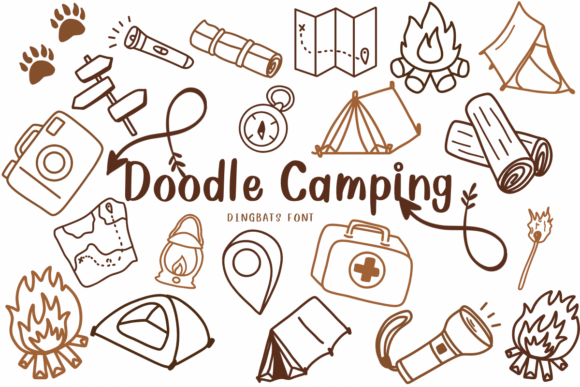
If you're working on a nature-themed design and want to add a touch of hand-drawn charm, Doodle Camping might be exactly what you need. This dingbat font is packed with rustic outdoor icons like tents, campfires, maps, and flashlights, all drawn in a friendly, hand-crafted style. Whether you're designing invitations, branding materials, or educational content, this font brings a sense of adventure to your visuals.
What Makes Doodle Camping Unique?
Unlike standard fonts, Doodle Camping isn't made up of letters and numbers. Instead, it contains a collection of illustrated icons that represent common camping and outdoor items. Each symbol is hand-drawn, giving your designs a personal, approachable feel. The rustic aesthetic makes it especially useful for projects that need to feel grounded, natural, or nostalgic.
Who Can Benefit from Using Doodle Camping?
This font is great for a wide range of users. Designers working on nature-themed branding can use it to create cohesive visual identities. Entrepreneurs launching outdoor gear brands might find it useful for packaging and marketing materials. Educators can incorporate the icons into lesson plans or handouts about nature and survival skills. Even bloggers and social media creators can enhance their visuals by embedding these playful, recognizable graphics directly into text.
How to Use Doodle Camping in Real Projects
One of the biggest advantages of Doodle Camping is its versatility. Here are a few practical applications:
- Invitations: Use tent and campfire icons to decorate birthday or event invites with a camping theme.
- Product Packaging: Brands selling hiking gear, trail snacks, or outdoor accessories can incorporate the icons into labels and tags.
- Educational Materials: Teachers and content creators can visually break up text-heavy pages with relevant icons.
- Web and App Design: Add subtle visual cues to buttons, menus, or navigation bars using the font’s map or flashlight icons.
Getting Started with Doodle Camping
Using Doodle Camping is similar to working with any other font. Once installed, you can access the icons through your design software’s character map or glyph panel. Since it's a dingbat font, each key corresponds to a different image rather than a letter. It’s helpful to keep a reference sheet handy to quickly find the icon you need. Most designers find it easy to integrate into tools like Adobe Illustrator, Photoshop, or even web platforms using @font-face CSS rules.
Why Doodle Camping Works Well for Branding
For businesses centered around the outdoors, consistency in visual identity is key. Doodle Camping offers a unified style across multiple icons, making it easier to maintain a cohesive look. The hand-drawn style feels personal and approachable, which can help brands connect with their audience on an emotional level. Whether you're designing a logo, a social media post, or a product label, this font adds a sense of authenticity and warmth.
Design Tips for Best Results
To get the most out of Doodle Camping, consider the following tips:
- Pair with clean fonts: Let the rustic icons stand out by using them alongside modern, sans-serif typefaces.
- Limit color use: Since the icons are hand-drawn, keeping the color palette simple helps maintain clarity.
- Use for emphasis: Don’t overdo it—use the icons to highlight key points rather than fill every corner of your design.
- Test for readability: Make sure the icons are clearly visible at different sizes, especially for print or mobile use.
Things to Consider Before Using Doodle Camping
While Doodle Camping is versatile and fun, it’s not the right choice for every project. Because it's a stylized, hand-drawn font, it may not be suitable for formal or corporate settings. Also, since it's a dingbat font, it doesn’t support standard text input, so you’ll need to plan your layout carefully. If you're looking for a more realistic or technical look, you may want to explore other icon sets or vector graphics instead.
Where to Find Doodle Camping and How to Learn More
You can typically find Doodle Camping on font marketplaces or design resource sites. Always make sure to check the licensing terms before using it in commercial projects. Some creators offer demo versions, so you can test how the icons look in your designs before purchasing. Tutorials and user guides are often available through the provider or design communities, helping you get up to speed quickly.